
We asked our customers as well as our Customer Care team for feedback regarding the top areas where our customers have questions or could use some more information. Below are the top questions our customers had that we thought we’d address in this blog to provide a helpful resource for answering these questions and concerns.
What is the best way to reduce/stop spam calls?
We ALL hate spam calls. At Nex-Tech Wireless, we do our best to prevent our customers from being bombarded with unwanted spam calls and robocalls. However, we unfortunately cannot prevent all of them from coming through.
So how do spam/robocalls work and why do we all get so many of these kinds of calls?
First off, a robocall is an automated telephone call delivering a prerecorded message. The term robocall is often used to reference other types of calls made by spammers, spoofers, scammers, and more. These types of calls are different than normal scam calls because there is no real human on the other side of the call. These types of calls have become increasingly more common because prerecorded messages make it cheaper and easier for scammers to take advantage of others on a large scale. According to the FTC, some robocalls are random but, in some instances, companies and organizations get your information, either legitimately or by tricking you, and then sell it to telemarketers who then place those annoying calls1. We unfortunately have recently experienced issues with spam calls targeting our customers. Customers were receiving calls from people claiming to be NTW employees offering a discount. Most likely, this was a ruse to get important information out of our customers.
So, what is NTW doing to address this?
In 2021, all voice providers were required to adopt the STIR/SHAKEN protocol. The FCC describes the STIR/SHAKEN protocol as follows:
“STIR/SHAKEN is a framework of interconnected standards. STIR/SHAKEN are acronyms for the Secure Telephone Identity Revisited (STIR) and Signature-based Handling of Asserted Information Using toKENs (SHAKEN) standards. This means that calls traveling through interconnected phone networks can have their caller ID "signed" as legitimate by originating carriers and validated by other carriers before reaching consumers. STIR/SHAKEN digitally validates the handoff of phone calls passing through the complex web of networks, allowing the phone company of the consumer receiving the call to verify that a call is in fact from the number displayed on Caller ID.2”
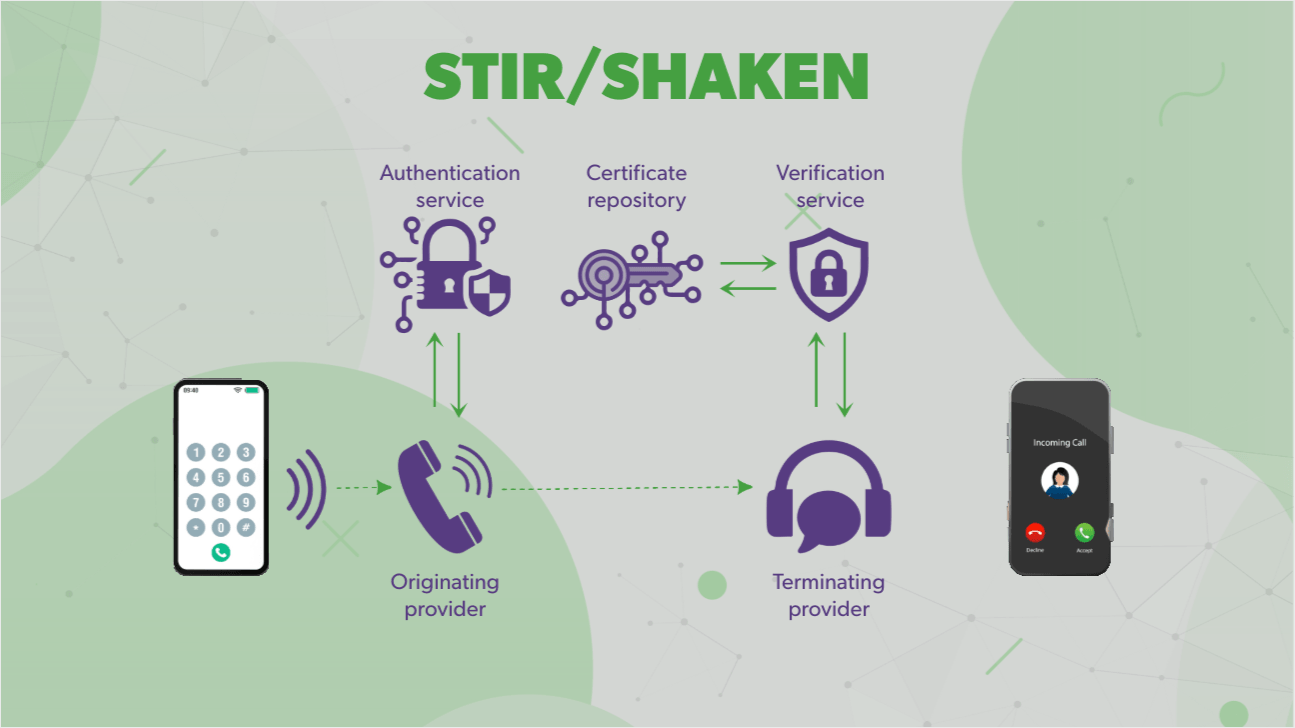
At Nex-Tech Wireless, we're providing our customers with a double layer of protection against unwanted spam and robocalls. Not only are we utilizing the STIR/SHAKEN protocol that allows for the authentication and verification of caller ID information for calls carried over Internet Protocol (IP) networks, but we are also utilizing Call Guardian for potential spam identification and verification. Our network analyses every call using A.I., machine learning and patented technologies to protect our customers. Our solution aims to block as many of the calls made with malicious intent as possible. The calls have the potential to invade your privacy through identity theft, money scams, and other forms of fraud. Those that appear to have moderate risk but are not confirmed as dangerous will be flagged and may appear as "Possible Scam", "Possible Spam", or "Possible Fraud". Our goal is to give you as much information as possible for your protection. You can learn more about Call Guardian and all that we do to stop robocalls here.
So, what can you do about unwanted spam and robocalls?
If you get a call and are not sure if it is legitimate or a spam call, DO NOT give out any personal information. If, for example, you get a call claiming to be from your bank but are unsure if the caller is who they say they are, hang up and look up the number for the bank and call it back. Even if the caller spoofed the number, when you call it, you will reach the actual bank and can confirm with someone whether you had received a call from them or not. If you have identified a robocall or spam call, we recommend you report it right away. To report these calls, visit https://reportarobocall.com/trf/ and feel free to add your number to the Nationwide Do Not Call Registry at www.donotcall.gov. If you receive an unwanted call after your number has been on the National Registry for 31 days, report it to the FTC. And if all else fails, we recommend not answering calls you are not familiar with and are not expecting.
How do a login/create an online account?
Creating an online account is quick and easy! Once you have reached our home page, you’ll see 3 buttons on the top right side of the screen.
Choose login and it will take you to the sign in page.
Choose “Register” and fill out the information on the next page. You will need your account number, your zip code, and the name on the account. If you need help locating your account number, it is present on your bill. However, you can always call our Customer Care team at 877-621-2600 or visit your local Nex-Tech Wireless retail store or authorized agent, and they can help you and provide you with your account number. Once the account has been created, you can set up your username and password and from there, you’ll have access to your online account! Below, we have included a step-by-step walkthrough with visuals to help you create and sign into your online account.
And, while we currently do not have a mobile app, we are in the early planning stages of building a new and improved NTW app! This upgraded interface will make it easier than ever to manage your account with faster navigation, smarter tools, and a fresh design. In the meantime, the Nex-Tech Wireless online account is optimized for mobile so you can still have the same access to your account right from your phone or tablet!
How can I view calls/messages for other lines on my account?
Once signed into your online account, you will be on the “Account Summary” page. From here, you can select “Usage.”
On the Usage page, you can then select “View Usage Details.”
Here, it will ask you to select the number that you want to see the usage of.
From here, you can see the usage details and even export it as an Excel file.
Again, we have included a visual step-by-step guide to aid you in viewing your usage history via your online account.
We hope this blog was able to answer a few of the question you might have but if not, you can always relay on our Customer Care team to assist you. You can reach our Care Team at 877-621-2600 or can send your inquiries to customercare@ntwls.com. You can even chat with our team via online chat on our website by choosing the “Chat” icon in the lower right corner of any page. If you prefer to work with someone in person, you can always stop by your nearest Nex-Tech Wireless retail location or authorized agent location for assistance.
Sources:
1. FTC - https://consumer.ftc.gov/consumer-alerts/2023/12/how-are-robocallers-getting-your-phone-number
2. FCC - https://www.fcc.gov/call-authentication
Resources:
https://www.nex-techwireless.com/support/call-guardian
